

Summary
Capacitive is the default touch technology for industrial, medical, and instrumentation interfaces, but capacitive is a category rather than a product. Surface capacitive and PCAP behave differently enough that choosing between them is an engineering decision, and PCAP itself splits into mutual and self-capacitance sensing. The constraints that matter most, including glove operation, EMI exposure, sunlight readability, and construction method, have to be specified before tooling rather than after. This guide gives OEMs and design engineers the technical basis for that choice.
In this blog, you'll learn:
- How capacitive sensing works, and why sensing charge instead of pressure drives every trade-off that follows
- How capacitive compares to resistive across clarity, glove use, durability, moisture, EMI, and cost
- What each capacitive construction does well, and where each one fails
- A decision framework for choosing between them, including when to specify resistive instead
- The three capacitive construction methods, the ITO glass and film options available, and which published limits apply to resistive rather than capacitive
- What optical bonding, cover lens choice, and coatings do for contrast, strength, and sunlight readability
- How Butler Technologies, Inc. (BTI) supports OEMs from design through full-scale production
If you are specifying a touch interface for an industrial control panel, a medical device, or a piece of test equipment, the question is rarely whether capacitive is the right technology. It is which capacitive construction to use, how large it can be, and how it will behave when an operator is wearing gloves or standing next to a motor drive.
This Blog covers the four capacitive types, how they compare to resistive, the sizes and durability figures Butler Technologies can actually produce, and a decision framework for choosing between them.
Every specification quoted below is published on our own custom touch screen product page, not estimated. It is written for OEMs, design engineers, and sourcing managers.
Brief History of Capacitive Touch Screens
- 1960s: Initial capacitive sensor technology developed for radar systems
- 1980s: Early use in industrial applications and ATMs
- 2000s: Introduction in consumer electronics with PDAs and smartphones
- Today: Widespread use across industries, with continuous innovation in flexibility, sensitivity, and durability
What is a Capacitive Touch Screen?
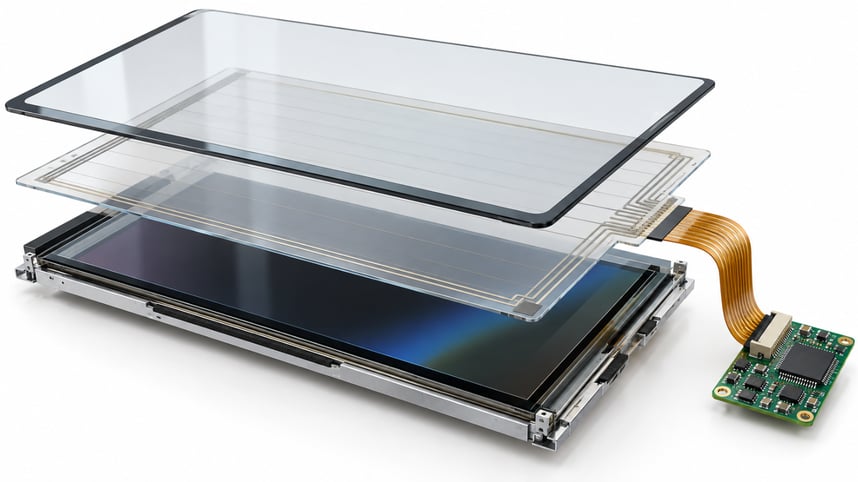
A capacitive touch screen is a display technology that uses the conductive properties of the human body to detect and respond to touch. Instead of pressure-based input like a resistive touch screen, a capacitive screen registers changes in capacitance when a finger or conductive stylus comes close to or touches the screen.
Capacitive touch panels are made with layers of glass or plastic coated with a conductive material like indium tin oxide (ITO). These layers form an electrostatic field that changes when touched, allowing the screen to pinpoint the location of the contact.
Capacitive touch displays are commonly used in consumer electronics, medical equipment, industrial control panels, and automotive infotainment systems. Capacitive touchpads are also integrated into laptops and other compact input systems.
Learn more about printed electronics and how advanced materials are used in custom interface designs.
How Do Capacitive Touch Screens Work?
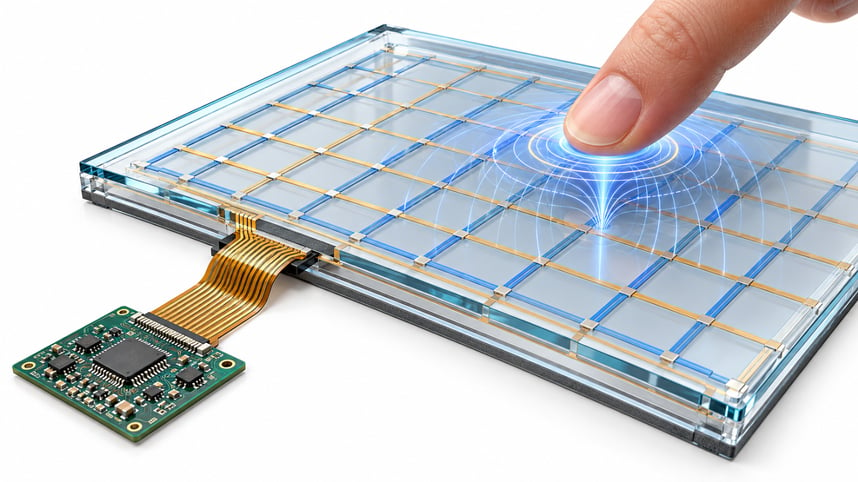
Capacitive touch screens operate based on the principle of capacitance. Here’s a simple breakdown:
- The screen holds a constant electrostatic field.
- When a conductive object (like your finger) touches the screen, it disrupts the field.
- This disruption changes the local capacitance.
- Sensors around the screen detect the location of the change.
- The touch controller processes this data and determines the touch point.
Types of Capacitive Touch Screens
Capacitive touch is a category, not a product. The four types of capacitive touch screens described below behave differently enough that choosing between them is a real engineering decision.
A. Surface Capacitive Touch Screens
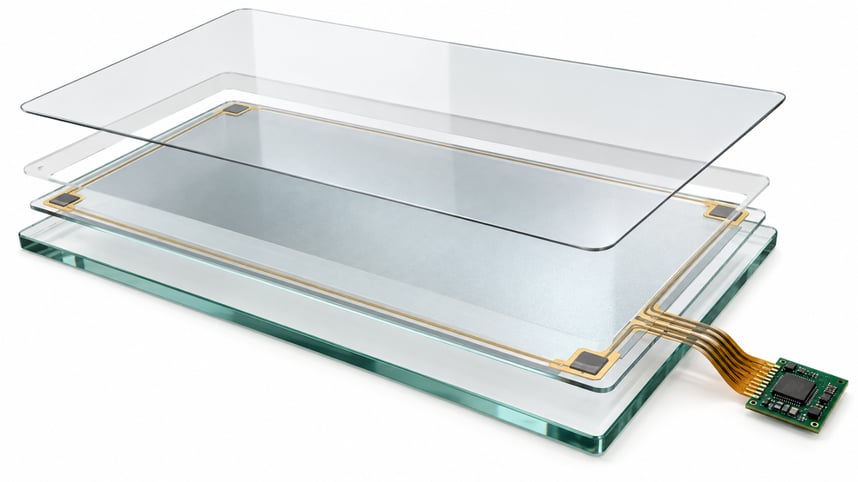 This is one of the simplest forms of capacitive screens. A conductive coating is applied to one side of the glass, and a small voltage is applied to the corners. When a finger touches the screen, it draws a small current from each corner.
Advantages:
- Durable and resistant to contaminants
- Cost-effective
Limitations:
- Can not support multi-touch
- Less sensitive than projected capacitive versions
- Often less responsive with gloved hands or styluses
Common Uses:
- Kiosks
- ATMs
- Ticket vending machines
B. Projected Capacitive Touch Screens (PCAP)
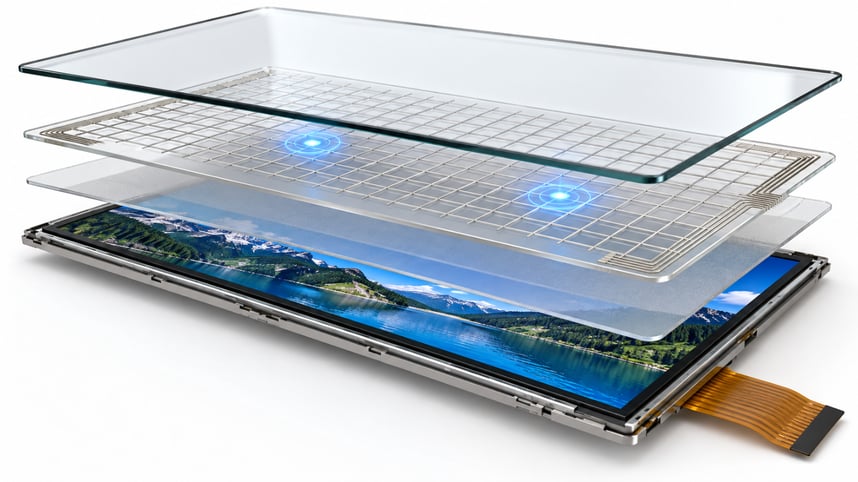 This is the most advanced and commonly used type of capacitive touch panel. It has a grid of transparent conductive materials layered between glass sheets. It detects touch points by measuring changes in the electrical field across the grid.
Advantages:
- Supports multi-touch
- High sensitivity and accuracy
- Works behind a protective glass or plastic front surface
- Ideal for rugged, outdoor, or industrial use
Subtypes:
- Self-Capacitance: Measures individual electrode-to-ground capacitance
- Mutual Capacitance: Measures changes between intersecting electrodes (better for multi-touch)
Common Uses:
- Smartphones and tablets
- Medical monitors
- Industrial HMIs
Learn how capacitive touch sensors are custom-engineered for rugged environments.
C. PCT Mutual Capacitance
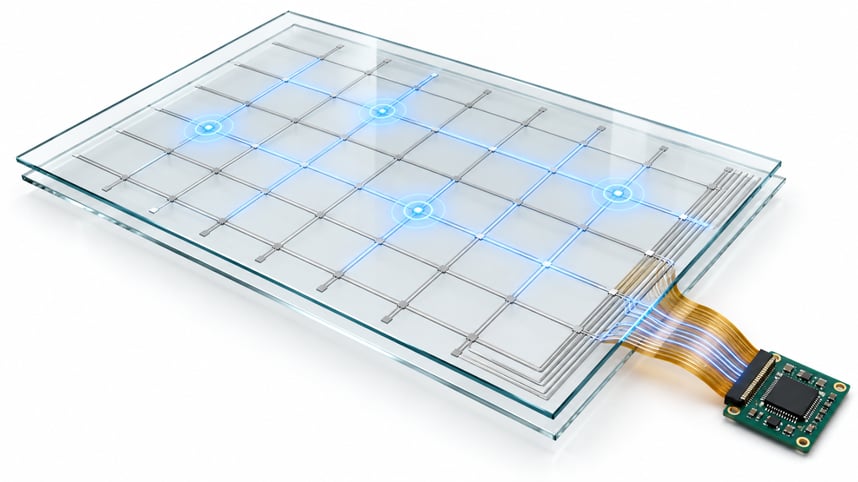 PCT (Projected Capacitive Technology) Mutual Capacitance involves a matrix of rows and columns of conductive material, where each intersection functions as a capacitor. When a finger approaches, it changes the mutual capacitance between electrodes.
Advantages:
- True multi-touch capability (tracks multiple fingers simultaneously)
- Excellent noise immunity and responsiveness
- Widely used in smartphones and tablets
Common Uses:
- Advanced consumer devices
- Medical touch screens
- High-end kiosks and interfaces
- Multi-user equipment
D. PCT Self-Capacitance
PCT Self-Capacitance measures changes in capacitance between electrodes and the ground. It uses simpler circuitry than mutual capacitance and is often more sensitive but can struggle with accurately tracking multiple simultaneous touches.
Advantages:
- Simpler design and lower cost
- Higher sensitivity
Limitations:
- Limited multi-touch support (ghosting effects)
Common Uses:
- Touch-enabled appliances
- Budget-friendly consumer electronics
Explore how printed flexible sensors support innovations in bendable electronics.
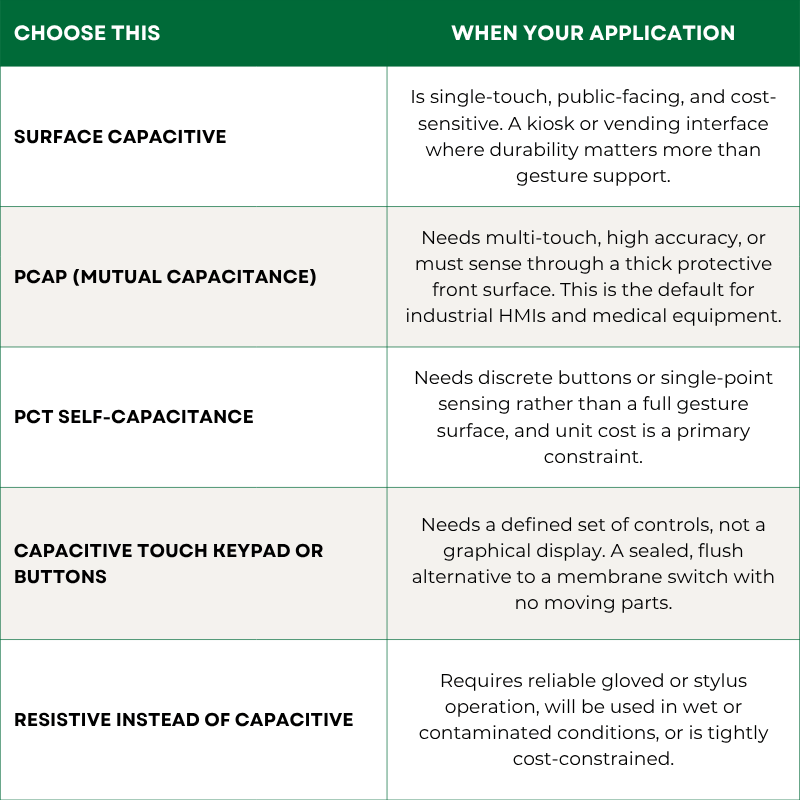
Which Capacitive Touch Type Should You Choose
 Sizes, Construction, and Durability
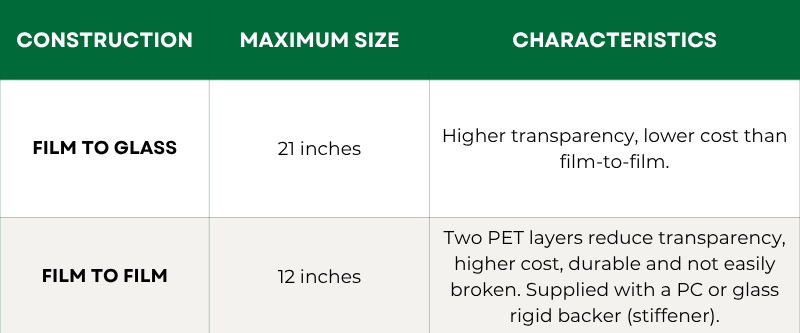
Two construction methods dominate custom capacitive and resistive touch screen builds, and they set the practical size ceiling for your design.
Durability ratings:
- Rated for use up to 1,000,000 times
- Withstands writing of 100,000 characters in the same area, the relevant figure for signature-capture and stylus-entry applications
Film layer options:
- Clear or anti-glare hard-coated film (.007 inch)
- Clear or anti-glare hard-coated film with anti-Newton Ring coating (.008 inch)
- ITO coating applied to the non-hardcoat side
ITO glass: standard and chemically strengthened conductive ITO glass is available in 0.55mm, 0.7mm, 1.1mm, 2.0mm, and 3.0mm thicknesses. Chemically strengthened glass offers greater impact and break resistance, and it is the specification to ask for in any rugged, vehicle-mounted, or public-access application.
Optical Bonding, Cover Lens, and Sunlight Readability
Optical bonding fills the air gap between the touch sensor or cover glass and the display with a clear resin. Removing that gap eliminates one of the internal reflection surfaces, which raises contrast, reduces glare, and makes the assembly stiffer and more resistant to impact. It is the single most effective change available when a screen has to stay readable in direct sunlight.
Three specifications work together here, and they should be decided as a group rather than one at a time:
- Cover lens: material and thickness, chosen against impact risk and the sensing distance the controller has to work through
- Coatings: anti-glare, anti-reflective, and anti-fingerprint treatments, each solving a different problem
- Bonding method: optically bonded or air-gapped, which determines contrast and structural strength
If the equipment will be used outdoors, in a vehicle cab, or near a window, treat sunlight readability as a requirement in the specification rather than a finish option. Retrofitting it after the stack is tooled means rebuilding the assembly.
Advantages of Capacitive Touch Screens
Capacitive touch displays offer a wide range of benefits:
- High Durability: Made of toughened glass; scratch and impact resistant
- Excellent Clarity: High light transmission ensures vibrant display quality
- Multi-Touch Capability: Recognizes gestures like pinch-to-zoom or swiping
- Fast Response: Minimal delay between touch and action
- Low Maintenance: Easy to clean and resistant to dust and oils
- Long Lifespan: No mechanical wear and tear like resistive touchscreens
- Sleek Aesthetics: Enables seamless, modern design
Applications of Capacitive Touch Technology
Capacitive touch panels are found in numerous industries due to their adaptability and performance:
- Consumer Electronics: Smartphones, tablets, laptops, smartwatches
- Industrial Controls: Human-Machine Interfaces (HMIs), factory automation, kiosks, panel PCs
- Medical Devices: Touch interfaces on monitoring and diagnostic equipment, often sealed to meet hygiene standards
- Automotive: Infotainment systems, dashboard controls, navigation
- Retail: Point-of-Sale (POS) terminals, digital signage, self-service kiosks
- Aerospace and Defense: Avionics displays, tactical systems
See how medical device interfaces are designed to meet strict performance and hygiene requirements.
Design Considerations for Capacitive Screens
When integrating capacitive touchscreens into a device, several factors must be considered:
- Display Type: Choose between glass, plastic, or hybrid panels based on environment
- Operating Environment: Consider moisture, EMI/RFI noise, temperature, and dust exposure
- User Interaction Needs: Multi-touch vs. single-touch, stylus vs. finger
- Glove Use: Use tuning techniques or select advanced PCAP technology for glove input
- Durability Requirements: Rugged coatings or laminated protection for outdoor/industrial settings
Capacitive Touch vs. Resistive Touch: A Quick Comparison
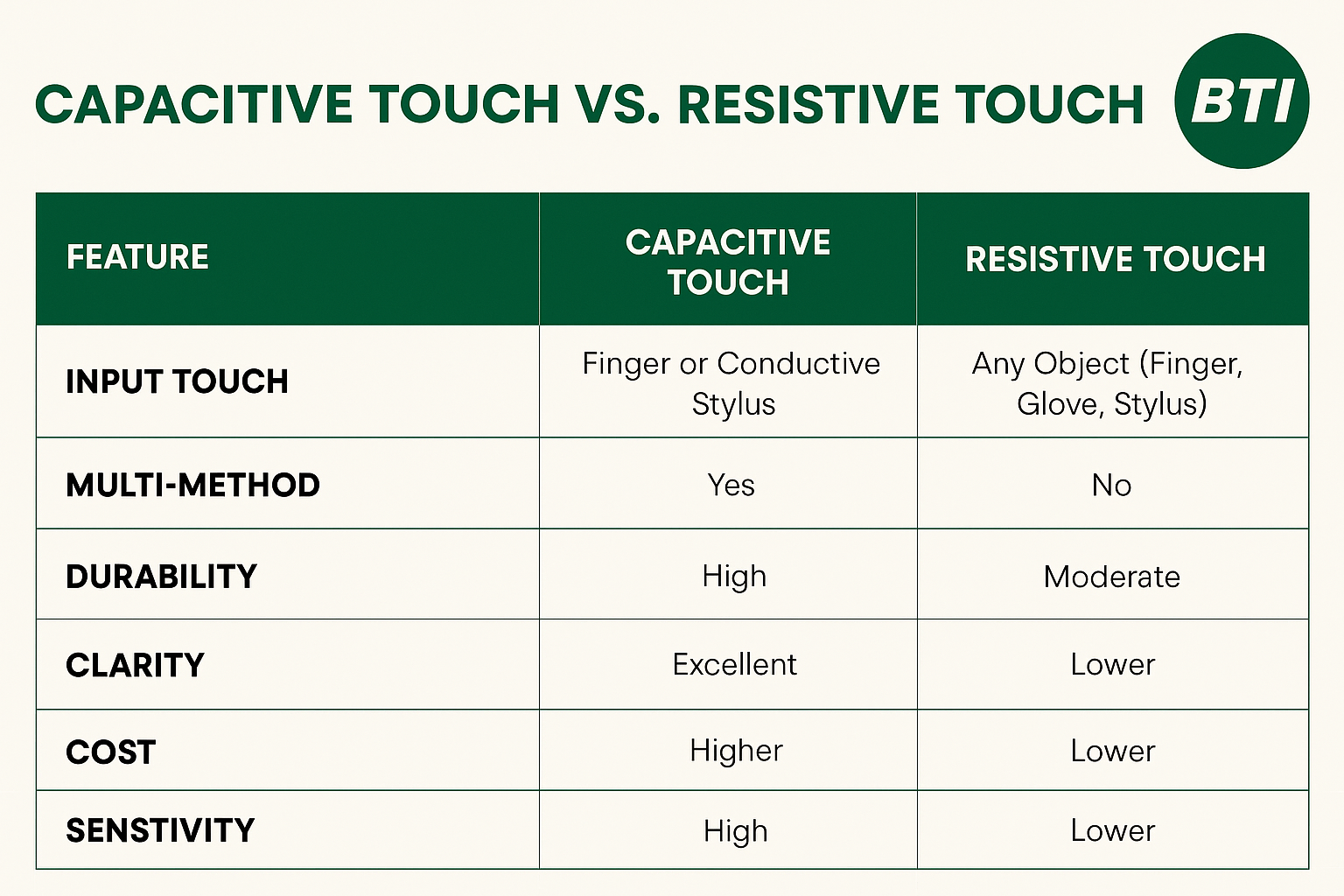 Capacitive touchpads and screens offer a superior user experience with better responsiveness, durability, and support for gestures. Resistive screens are still useful for low-cost or gloved environments, especially in industrial or medical applications.
Limitations and Considerations
1. Moisture Sensitivity
Capacitive touch screens can be affected by moisture, water droplets, or high humidity. Since they detect touch based on electrical charge, any conductive liquid on the surface can interfere with signal accuracy. This may lead to false touches or unresponsiveness unless the device is specially treated or sealed. In industrial and medical settings, water-resistant coatings or IP-rated enclosures are often used to mitigate this issue.
2. Glove Use
Standard capacitive screens typically don't respond to gloved touches because gloves insulate the human finger’s electrical charge. While this isn’t an issue for bare-handed users, it can be problematic in environments like hospitals, cold climates, or industrial sites where gloves are mandatory. However, manufacturers now offer glove-compatible PCAP touchscreens by increasing sensitivity or using specialized firmware.
3. Higher Initial Cost
Capacitive touchscreens, especially projected capacitive types, generally have a higher upfront cost compared to resistive screens due to their materials, layered construction, and precision sensors. That said, their longer lifespan, reduced maintenance, and better user experience often justify the cost in the long run—making them a cost-effective investment over time.
4. EMI Interference
Capacitive screens are susceptible to Electromagnetic Interference (EMI) and Radio Frequency Interference (RFI), especially in industrial or military environments where electrical noise is common. Without proper shielding, EMI can affect touch accuracy or cause the screen to malfunction. To prevent this, designers often incorporate EMI filters, shielding films, or grounding techniques.
5. False Touches
Capacitive screens are highly sensitive, which makes them more prone to registering unintended touches. Environmental factors such as static electricity, screen contamination, or hovering fingers can sometimes trigger ghost touches. Advanced touch controllers and firmware algorithms are used to filter out noise and improve input accuracy, especially in high-precision applications.
Recent Innovations in Capacitive Touch Technology
- Glove and Stylus Compatibility: Improved tuning and conductive styluses for broader input options
- Flexible Screens: Used in foldable phones and curved interfaces
- Bezel-less and Edge-to-Edge Designs: Enhancing aesthetics and usability
- Integration with AI & IoT: For smart environments and adaptive interfaces
- Advanced Materials: Graphene and silver nanowire for enhanced conductivity
- Embedded Touch Feedback: Combining haptics and capacitive sensors for interactive user experiences
The capacitive touch screen has set a new standard for user interaction. Its ability to deliver fast, responsive, and visually clear touch experiences makes it the top choice across industries. From smartphones to industrial controls, capacitive touch displays are evolving rapidly, offering more flexibility and innovation than ever before.
Whether you're designing consumer products or industrial systems, understanding the principles, types, and benefits of capacitive technology helps you make smarter choices. With options like projected capacitive, in-cell designs, and flexible displays, the capacitive touch panel continues to lead the future of user interface design.
As demand for seamless and smart interfaces continues to grow, the capacitive touch panel remains at the heart of the human-machine interaction revolution.
Looking for a custom capacitive screen solution? Learn how Butler Technologies supports custom designs on our capabilities page.
What Butler Technologies Builds
At Butler Technologies, Inc. (BTI), custom touch screens are built around OEM and engineering needs, from design through volume. We do not sell off-the-shelf panels. Every build is engineered to the application.
Our touch screen product range:
- Projected capacitive (PCAP) touch screens: multi-touch, custom sizes up to 21 inches
- Resistive touch screens: for gloved, wet, or cost-driven applications
- Capacitive touch keypads and buttons: a sealed, flush, no-moving-parts alternative to a membrane switch where you need defined controls rather than a display
- Planar touch screens: all interface elements surrounded by controls beneath a single graphic overlay, for a seamless front panel
Integration: touch screens can be combined with LCD or LCD-TFT displays and integrated with graphic overlays, membrane switches, or a bezel, so the touch surface, branding, and hard controls arrive as one assembly rather than as parts you have to align yourself.
Materials and options: film-to-glass and film-to-film constructions, standard and chemically strengthened ITO glass from 0.55mm to 3.0mm, anti-glare and anti-Newton-Ring coatings, optical bonding and cover lenses, and custom cable and connector terminations.
Manufactured in the United States, with in-house integration of touch, display, and HMI. Specifying a custom capacitive touch screen? Request a quote from Butler Technologies.
Key Takeaways
- The decision is rarely capacitive versus resistive alone. It is which of the four capacitive constructions fits the application.
- PCAP mutual capacitance is the default for industrial HMIs and medical equipment. Surface capacitive suits single-touch public terminals.
- Glove operation, EMI exposure, sunlight readability, and washdown are specification items, not adjustments made after tooling.
- Real limits shape what is buildable: 21 inches film-to-glass, 12 inches film-to-film, rated to 1,000,000 uses.
- Chemically strengthened ITO glass and optical bonding are the options to ask for in any rugged or outdoor design.
Frequently Asked Questions (FAQs)
Can a capacitive touch screen be used with gloves?
Not by default. A standard capacitive stack will not register a gloved touch reliably, because the glove insulates the finger’s charge. Glove operation is achievable with a PCAP screen by increasing controller sensitivity or using glove-tuned firmware, but it must be specified at the design stage, along with the glove material and thickness. Where gloves are constant and the environment is also wet, a resistive screen is often the more robust answer.
Is a capacitive touch screen more expensive than resistive?
Yes, upfront. Projected capacitive costs more than resistive due to its layered construction and precision sensing. Over a full product life the gap narrows: capacitive screens are rated for up to 1,000,000 uses with no mechanical wear layer, so replacement and service intervals are typically longer.
What is the largest capacitive touch screen you can produce?
Film-to-glass construction supports sizes up to 21 inches. Film-to-film construction, which is more durable but less transparent, is available up to 12 inches. Smaller custom sizes are routine; the practical lower limit is driven by your bezel and connector layout rather than the sensing technology.
How do you handle EMI in an industrial environment?
Through a combination of shielding layers within the stack, EMI filtering on the controller lines, and a defined grounding scheme. The right approach depends on the noise source and frequency, which is why we ask about the operating environment: motor drives, RF equipment, switching supplies during design review rather than after tooling.
Can a touch screen be integrated with an overlay or bezel?
Yes. Touch screens can be combined with LCD or LCD-TFT displays and supplied integrated with graphic overlays, membrane switches, or a bezel as a single assembly. Our touch screens take this further, placing all interface elements and surrounding controls beneath one continuous graphic overlay.